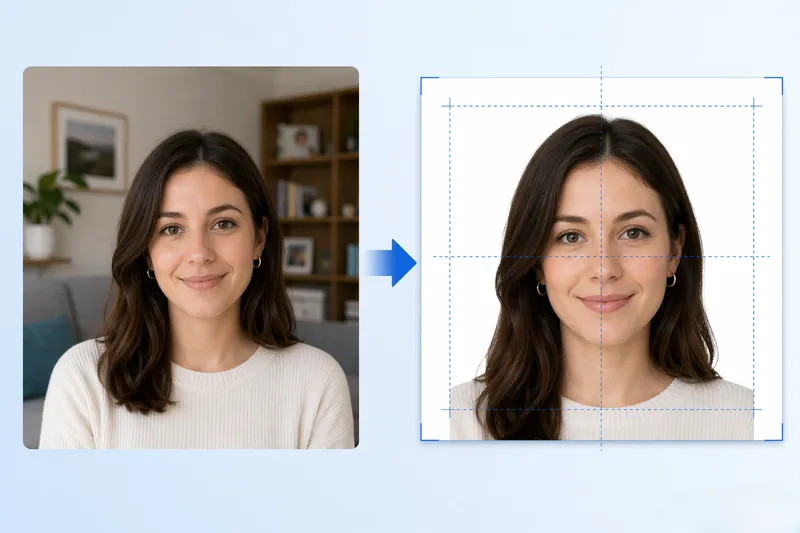
To make a passport photo: upload a front-facing photo, the tool crops to 2×2 inches, removes the background, and generates a 300 DPI print sheet for CVS or Walgreens.
FreeToolHub Passport Photo Maker is a free browser-based tool that creates 2×2 inch US passport photos with AI background removal, no signup, no upload.
O Que É o Gerador de Fotos de Passaporte?
O gerador de fotos de passaporte é uma ferramenta gratuita, baseada em navegador, que cria fotos de passaporte dos EUA em conformidade de 2×2 polegadas (51×51 mm) sem exigir uma viagem a um estúdio fotográfico ou farmácia. Ele usa detecção facial com IA para recortar e alinhar automaticamente sua foto para atender aos requisitos do Departamento de Estado dos EUA: tamanho da cabeça entre 1 polegada e 1⅜ polegadas, centralizado em um fundo branco simples, com o rosto completo visível e os olhos abertos. A ferramenta remove automaticamente fundos não brancos e gera uma folha pronta para impressão de 300 DPI — a resolução exata necessária para pedidos oficiais de passaporte.
Quem Deve Usar Esta Ferramenta?
Esta ferramenta é para qualquer pessoa que esteja solicitando ou renovando um passaporte dos EUA, visto ou documento de identificação governamental. É especialmente útil para famílias com crianças (que muitas vezes têm dificuldade em fazer as crianças ficarem paradas em um estúdio fotográfico), pessoas que moram longe de uma CVS/Walgreens e qualquer pessoa que queira economizar os $15-30 que as farmácias cobram por foto de passaporte. Também é usada por advogados de imigração, agentes de viagens e expatriados que precisam de fotos em conformidade rapidamente.
Como Esta Ferramenta Funciona?
O processo leva cerca de 30 segundos: (1) Faça o upload ou tire um selfie com seu celular ou webcam. (2) O modelo de IA detecta seu rosto, calcula a área de recorte correta e verifica a conformidade (tamanho da cabeça, posição dos olhos, fundo). (3) A ferramenta remove automaticamente qualquer fundo não branco e substitui por um fundo branco puro. (4) Ela gera uma folha de impressão 4×6 polegadas a 300 DPI contendo duas fotos de 2×2 polegadas — pronta para imprimir na CVS, Walgreens, Walmart ou qualquer impressora fotográfica. (5) Alternativamente, exporte um único arquivo digital de 2×2 polegadas para renovação de passaporte online ou solicitações de visto.
Quais São os Requisitos Atuais para Fotos de Passaporte dos EUA?
O Departamento de Estado dos EUA exige: Tamanho da foto 2×2 polegadas (51×51 mm); tamanho da cabeça de 1 a 1⅜ polegadas (25-35 mm) da parte inferior do queixo ao topo da cabeça; fundo branco ou branco-off; tirado nos últimos 6 meses; rosto completo, vista frontal, com expressão neutra e olhos abertos; roupa do dia (sem uniformes, sem chapéus, sem óculos). Esta ferramenta aplica todos esses requisitos automaticamente.
Perguntas frequentes
Esta ferramenta de foto de passaporte é realmente gratuita?
Sim, 100% gratuita sem cadastro, sem marca d'água e sem custos ocultos. O modelo de IA funciona inteiramente no seu navegador. Você só paga se escolher imprimir a folha de foto em uma farmácia (a CVS cobra ~$0,39 por uma impressão 4×6, em comparação com $15,99 pelo serviço de foto de passaporte deles).
Posso imprimir a foto na CVS ou Walgreens?
Sim. A ferramenta gera uma folha de impressão padrão de 4×6 polegadas contendo duas fotos de passaporte de 2×2 polegadas a 300 DPI. Salve a imagem, faça o upload para o CVS Photo, Walgreens Photo ou Walmart Photo online e selecione impressão 4×6 polegadas. Retire em cerca de uma hora por ~$0,39. Em seguida, recorte as duas fotos de passaporte.
A ferramenta atende aos requisitos do Departamento de Estado dos EUA?
Sim. A ferramenta aplica o tamanho de 2×2 polegadas, tamanho da cabeça de 1 a 1⅜ polegadas, fundo branco e alinhamento facial correto. No entanto, o Departamento de Estado também exige que a foto seja tirada nos últimos 6 meses, sem óculos, sem chapéus e com expressão neutra. Certifique-se de que sua foto atende a esses critérios antes de enviar.
Posso usar isso para renovação de passaporte online?
Sim. Para renovação de passaporte online, você pode exportar um único arquivo digital JPEG de 2×2 polegadas e fazer o upload diretamente no site do Departamento de Estado. O arquivo atende à resolução exigida (pelo menos 600×600 pixels) e às especificações de formato.
Posso fazer fotos de visto para outros países?
Sim. A ferramenta suporta 8 tipos de ID incluindo Passaporte dos EUA (2×2 polegadas), Visto dos EUA, Visto Schengen (35×45 mm), Passaporte do Reino Unido, Passaporte Canadense (50×70 mm), Passaporte Indiano (2×2 polegadas), Visto Chinês (33×48 mm) e Passaporte Japonês (35×45 mm). Selecione o tipo de ID e a ferramenta ajusta as dimensões automaticamente.
Minha foto é enviada para um servidor?
Não. O modelo de IA funciona 100% no seu navegador usando WebGPU ou WASM. Sua foto é processada localmente e nunca enviada para nenhum servidor. Não há cadastro, nenhuma conta e nenhuma coleta de dados. Esta é uma grande vantagem de privacidade em relação a serviços de foto de passaporte online.
Posso fazer uma foto de passaporte 2×2 online gratuitamente?
Sim. Faça o upload de uma selfie ou foto de retrato, e a ferramenta de IA corta, alinha e remove o fundo automaticamente para criar uma foto de passaporte dos EUA em conformidade de 2×2 polegadas (51×51mm). Ela gera uma folha de impressão de 300 DPI para CVS, Walgreens ou Walmart — tudo gratuito, sem cadastro.
Quais são os requisitos para fotos de passaporte dos EUA?
A foto deve ser de 2×2 polegadas (51×51mm), impressa em papel fotográfico a 300 DPI, com fundo branco. O tamanho da cabeça deve ser de 1 a 1⅜ polegadas do queixo ao topo do cabelo. Os olhos devem estar abertos, o rosto centralizado e a expressão neutra. Esta ferramenta verifica todos os requisitos automaticamente.
Esta ferramenta também funciona para fotos de visto?
Sim. A maioria dos vistos dos EUA requer o mesmo formato de foto de 2×2 polegadas que os passaportes. A ferramenta também suporta outros tamanhos de foto de ID (1×1 polegada, 35×45mm para vistos Schengen). Selecione o tamanho que você precisa, e a IA ajusta o recorte conforme necessário.
Can I make a 2x2 passport photo online for free?
Yes. Upload a selfie or portrait photo, and the AI tool automatically crops, aligns, and removes the background to create a compliant 2x2 inch (51x51mm) US passport photo. It generates a 300 DPI print sheet for CVS, Walgreens, or Walmart — all free, no signup.
What are the US passport photo requirements?
The photo must be 2x2 inches (51x51mm), printed on photo-quality paper at 300 DPI, with a white background. Head size must be 1 to 1-3/8 inches from chin to top of hair. Eyes must be open, face centered, and expression neutral. This tool checks all requirements automatically.
Does this tool work for visa photos too?
Yes. Most US visas require the same 2x2 inch photo format as passports. The tool also supports other ID photo sizes (1x1 inch, 35x45mm for Schengen visas). Select the size you need, and the AI adjusts the crop accordingly.