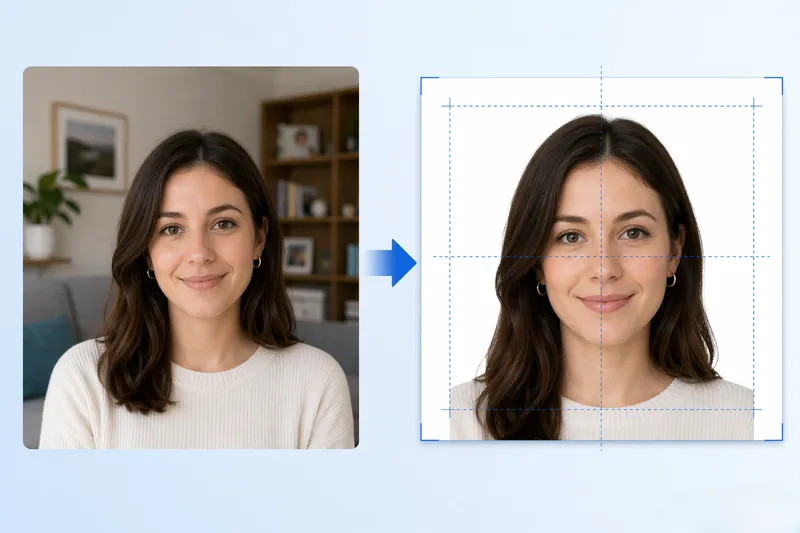
To make a passport photo: upload a front-facing photo, the tool crops to 2×2 inches, removes the background, and generates a 300 DPI print sheet for CVS or Walgreens.
FreeToolHub Passport Photo Maker is a free browser-based tool that creates 2×2 inch US passport photos with AI background removal, no signup, no upload.
Was ist der Passfoto-Ersteller?
Der Passfoto-Ersteller ist ein kostenloses, browserbasiertes Werkzeug, das konforme 2×2 Zoll (51×51 mm) US-Passfotos erstellt, ohne einen Besuch in einem Fotostudio oder einer Drogerie zu benötigen. Es verwendet KI-gestützte Gesichtserkennung, um Ihr Foto automatisch zuzuschneiden und auszurichten, um den Anforderungen des US-Außenministeriums zu entsprechen: Kopfgröße zwischen 1 Zoll und 1⅜ Zoll, zentriert auf einen einfachen weißen Hintergrund, mit vollem Gesicht sichtbar und Augen offen. Das Werkzeug entfernt automatisch nicht-weiße Hintergründe und erstellt einen druckfertigen 300 DPI Bogen — die exakte Auflösung, die für offizielle Passanträge erforderlich ist.
Wer sollte dieses Werkzeug verwenden?
Dieses Werkzeug ist für jeden, der einen US-Pass, Visum oder Personalausweis beantragt oder verlängert. Es ist besonders nützlich für Familien mit Kindern (die oft Schwierigkeiten haben, Kinder zum ruhigen Sitzen im Fotostudio zu bringen), Menschen, die weit von einer CVS/Walgreens entfernt leben, und jeder, der die 15-30 Dollar sparen möchte, die Drogerien pro Passfoto verlangen. Es wird auch von Einwanderungsanwälten, Reiseagenten und Expats verwendet, die schnell konforme Fotos benötigen.
Wie funktioniert dieses Werkzeug?
Der Prozess dauert etwa 30 Sekunden: (1) Laden Sie ein Selbstporträt mit Ihrem Telefon oder Webcam hoch oder nehmen Sie eines auf. (2) Das KI-Modell erkennt Ihr Gesicht, berechnet den richtigen Zuschneidebereich und überprüft die Konformität (Kopfgröße, Augenposition, Hintergrund). (3) Das Werkzeug entfernt automatisch jeden nicht-weißen Hintergrund und ersetzt ihn durch einen rein weißen Hintergrund. (4) Es erstellt einen 4×6 Zoll Druckbogen bei 300 DPI, der zwei 2×2 Zoll Fotos enthält — bereit zum Drucken bei CVS, Walgreens, Walmart oder jedem Fotodrucker. (5) Alternativ können Sie eine einzelne 2×2 Zoll digitale Datei für die Online-Passerneuerung oder Visumanträge exportieren.
Was sind die aktuellen US-Passfotovorschriften?
Das US-Außenministerium erfordert: Fotogröße 2×2 Zoll (51×51 mm); Kopfgröße 1 bis 1⅜ Zoll (25-35 mm) vom Kinn bis zum Kopf; einfacher weißer oder hellgrauer Hintergrund; innerhalb der letzten 6 Monate aufgenommen; volles Gesicht, Frontansicht, mit neutraler Mimik und offenen Augen; Alltagskleidung (keine Uniformen, keine Hüte, keine Brille). Dieses Werkzeug setzt automatisch alle diese Anforderungen um.
Häufige Fragen
Ist dieser Passfoto-Generator wirklich kostenlos?
Ja, 100 % kostenlos ohne Anmeldung, ohne Wasserzeichen und ohne versteckte Kosten. Das KI-Modell läuft vollständig in Ihrem Browser. Sie zahlen nur, wenn Sie sich entscheiden, den Foto-Bogen in einer Drogerie zu drucken (CVS verlangt ~0,39 $ für einen 4×6 Druck, verglichen mit 15,99 $ für ihren Passfoto-Service).
Kann ich das Foto bei CVS oder Walgreens drucken?
Ja. Das Werkzeug erstellt einen standardmäßigen 4×6 Zoll Druckbogen, der zwei 2×2 Zoll Passfotos bei 300 DPI enthält. Speichern Sie das Bild, laden Sie es bei CVS Photo, Walgreens Photo oder Walmart Photo online hoch und wählen Sie 4×6 Zoll Druck. Holen Sie es sich nach etwa einer Stunde für ~0,39 $ ab. Schneiden Sie dann die beiden Passfotos aus.
Erfüllt das Werkzeug die Anforderungen des US-Außenministeriums?
Ja. Das Werkzeug setzt die Größe von 2×2 Zoll, die Kopfgröße von 1 bis 1⅜ Zoll, den weißen Hintergrund und die richtige Gesichtspositionierung um. Das Außenministerium erfordert jedoch auch, dass das Foto innerhalb der letzten 6 Monate aufgenommen wurde, ohne Brille, ohne Hüte und mit neutraler Mimik. Stellen Sie sicher, dass Ihr Foto diese Kriterien erfüllt, bevor Sie es einreichen.
Kann ich dies für die Online-Passerneuerung verwenden?
Ja. Für die Online-Passerneuerung können Sie eine einzelne 2×2 Zoll digitale JPEG-Datei exportieren und direkt auf der Website des Außenministeriums hochladen. Die Datei erfüllt die erforderliche Auflösung (mindestens 600×600 Pixel) und die Formatvorgaben.
Kann ich auch Visafotos für andere Länder erstellen?
Ja. Das Werkzeug unterstützt 8 ID-Typen einschließlich US-Pass (2×2 Zoll), US-Visum, Schengen-Visum (35×45 mm), britischer Pass, kanadischer Pass (50×70 mm), indischer Pass (2×2 Zoll), chinesisches Visum (33×48 mm) und japanischer Pass (35×45 mm). Wählen Sie den ID-Typ und das Werkzeug passt die Abmessungen automatisch an.
Wird mein Foto auf einen Server hochgeladen?
Nein. Das KI-Modell läuft zu 100 % in Ihrem Browser mit WebGPU oder WASM. Ihr Foto wird lokal verarbeitet und niemals auf einen Server hochgeladen. Es gibt keine Anmeldung, kein Konto und keine Datenerhebung. Dies ist ein großer Datenschutzvorteil gegenüber Online-Passfoto-Services.
Kann ich kostenlos ein 2×2 Passfoto online erstellen?
Ja. Laden Sie ein Selbstporträt oder Porträtfoto hoch, und das KI-Werkzeug schneidet automatisch zu, richtet aus und entfernt den Hintergrund, um ein konformes 2×2 Zoll (51×51mm) US-Passfoto zu erstellen. Es erstellt einen 300 DPI Druckbogen für CVS, Walgreens oder Walmart — alles kostenlos, keine Anmeldung.
Was sind die US-Passfotovorschriften?
Das Foto muss 2×2 Zoll (51×51mm) groß sein, auf Fotopapier bei 300 DPI gedruckt, mit einem weißen Hintergrund. Die Kopfgröße muss 1 bis 1⅜ Zoll vom Kinn bis zum Kopf betragen. Die Augen müssen offen sein, das Gesicht zentriert und die Mimik neutral. Dieses Werkzeug überprüft automatisch alle Anforderungen.
Funktioniert dieses Werkzeug auch für Visafotos?
Ja. Die meisten US-Visa erfordern das gleiche 2×2 Zoll Fotoformat wie Pässe. Das Werkzeug unterstützt auch andere Ausweisfoto-Größen (1×1 Zoll, 35×45mm für Schengen-Visa). Wählen Sie die gewünschte Größe, und die KI passt den Zuschneid entsprechend an.
Can I make a 2x2 passport photo online for free?
Yes. Upload a selfie or portrait photo, and the AI tool automatically crops, aligns, and removes the background to create a compliant 2x2 inch (51x51mm) US passport photo. It generates a 300 DPI print sheet for CVS, Walgreens, or Walmart — all free, no signup.
What are the US passport photo requirements?
The photo must be 2x2 inches (51x51mm), printed on photo-quality paper at 300 DPI, with a white background. Head size must be 1 to 1-3/8 inches from chin to top of hair. Eyes must be open, face centered, and expression neutral. This tool checks all requirements automatically.
Does this tool work for visa photos too?
Yes. Most US visas require the same 2x2 inch photo format as passports. The tool also supports other ID photo sizes (1x1 inch, 35x45mm for Schengen visas). Select the size you need, and the AI adjusts the crop accordingly.